A courier hands you a spreadsheet of delivered shipments. A payment provider
confirms a batch of invoices. Now hundreds of WooCommerce orders need a status
update, and clicking through them one by one is not a plan.
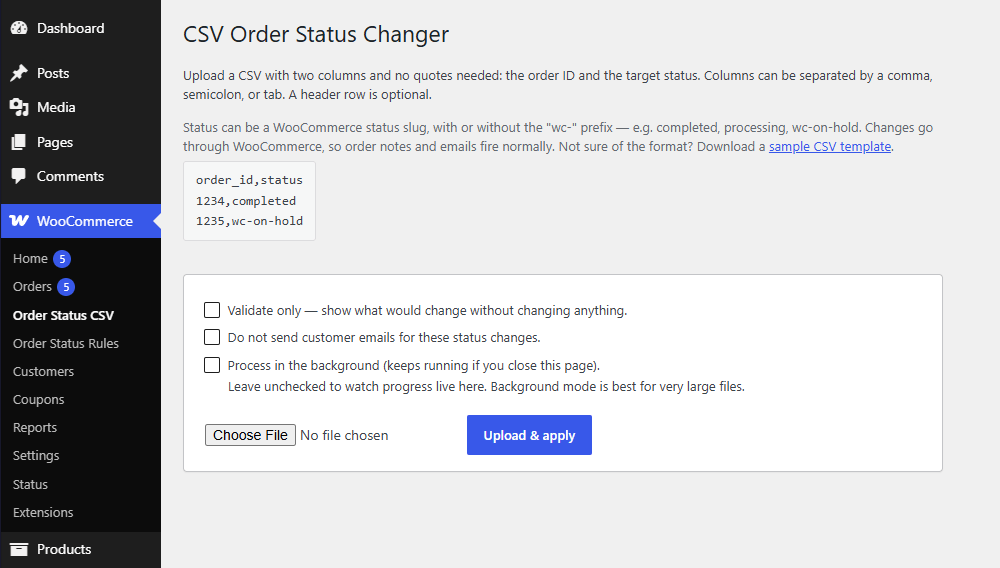
Laqi CSV Order Status Changer takes a two-column CSV (order ID, target status)
and applies it for you: validated first if you want, streamed with live
progress, and reported row by row so you know exactly what changed and what
needs a second look.
Why it is different
Stop finding and editing orders one by one
WooCommerce already handles a few visible orders well. This plugin is for the moment your source of truth becomes a spreadsheet.
× Without Laqi CSV Order Status Changer
Page-by-page selectionBuilt-in bulk actions only reach the orders currently visible in the admin.
Manual matchingEvery order number from the spreadsheet still has to be found by hand.
No safe previewChanges apply immediately, with no row-by-row validation or result file.
✓ With Laqi CSV Order Status Changer
Upload the list you already haveOrder ID and target status are enough to start a controlled bulk run.
Validate before changing anythingSee invalid order IDs, missing orders, unknown statuses, and expected changes first.
Keep a complete result logEvery row reports what changed, what was skipped, and what needs attention.
Compare your options
Option
Best for
Where it stops
WooCommerce bulk action
A few orders visible on one admin page.
Manual selection and only the statuses WooCommerce exposes there.
WP-CLI script
A technical one-off with server access.
No guided preview or downloadable audit trail.
Laqi CSV Order Status Changer This plugin
Repeatable spreadsheet-driven jobs of any practical size.
Requires an order ID and target status for each row.
What it does
Upload, watch it run
Premium
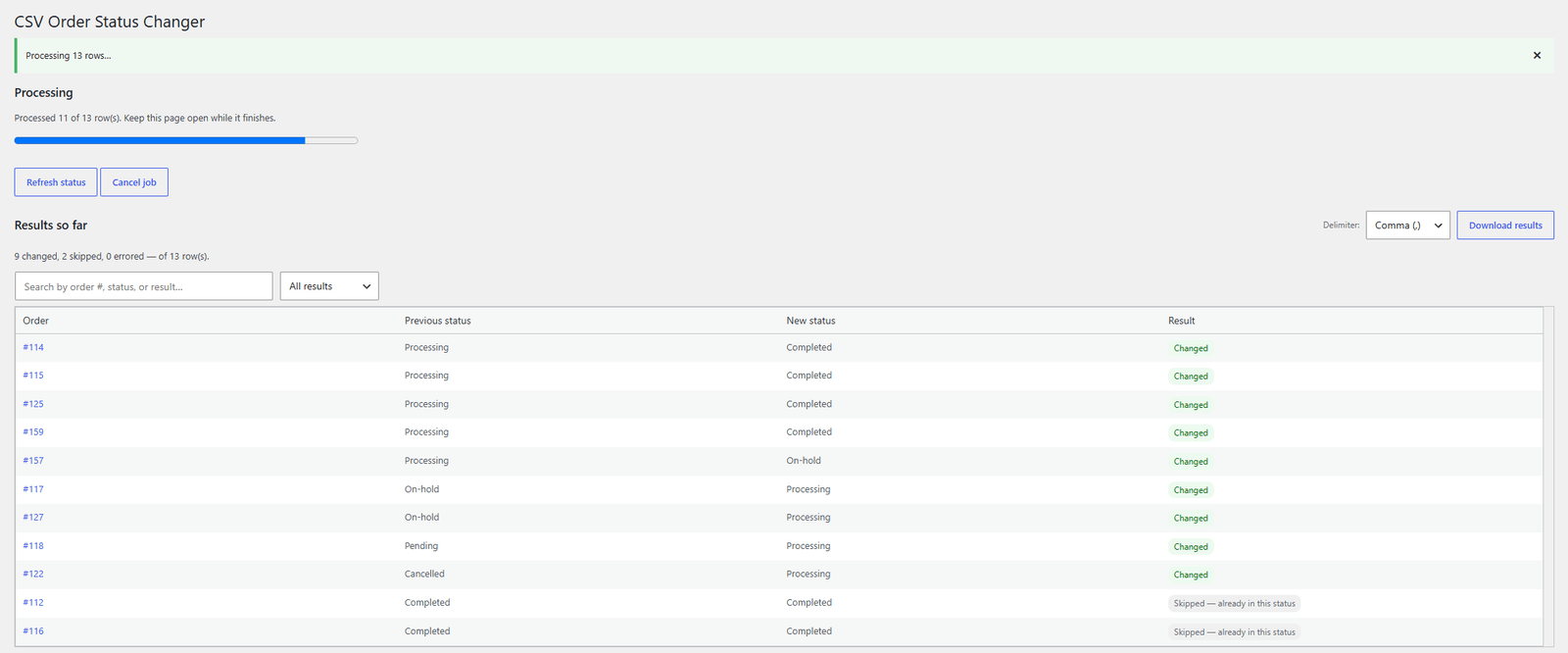
The upload is read into fixed-size storage pages, then interactive mode processes it in small chunks so the progress bar and result table fill in real time.
Background mode for huge jobs
Premium
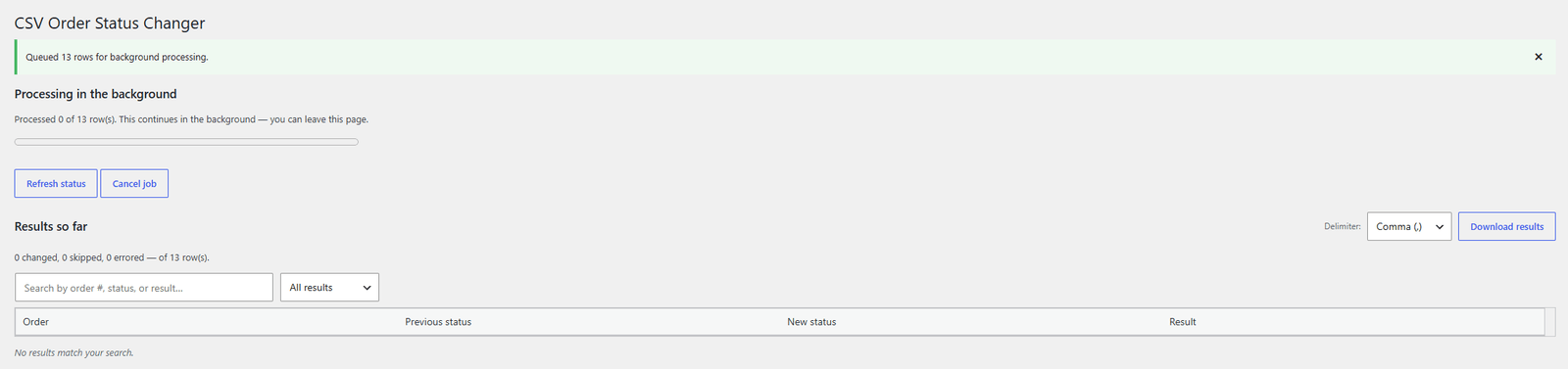
Hand very large or set-and-forget jobs to Action Scheduler and close the page. Stuck jobs are detected and offer a one-click resume.
Validate before you commit
Premium
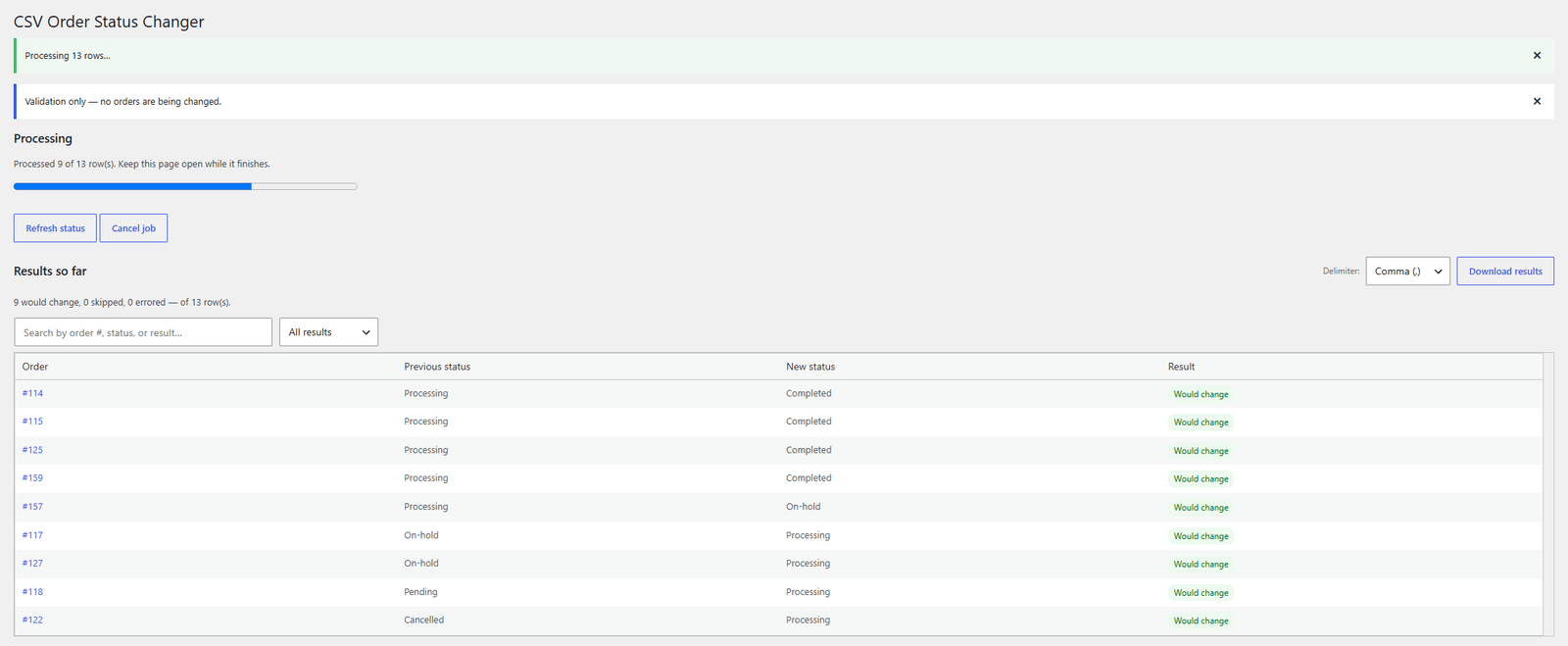
A validate-only mode previews exactly what would change, per order, without changing anything.
A result log that answers questions
Premium
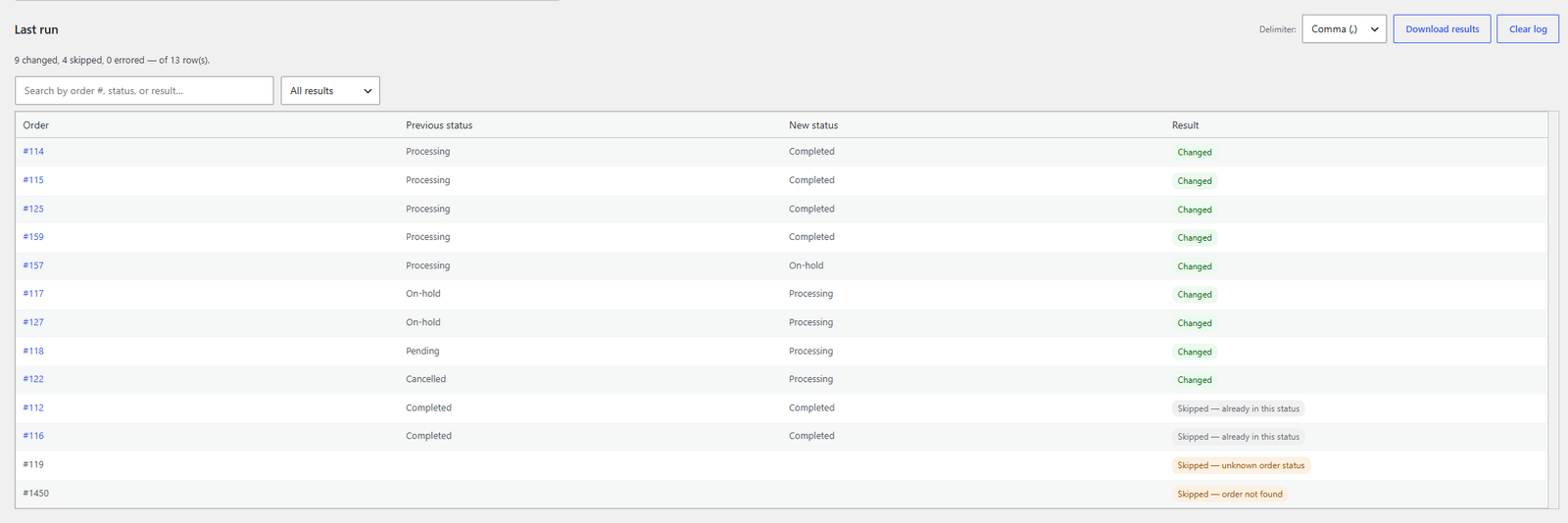
Every row reports its previous status, new status, and outcome (changed, skipped, needs attention, errored). Search it, filter it, download it as CSV.
Forgiving CSV handling
Premium
Comma, semicolon, or tab delimiters auto-detected, Excel's UTF-8 BOM handled, optional header row with columns named in any order, statuses with or without the wc- prefix, plus a sample template generated from your store's own statuses.
Control customer emails
Premium
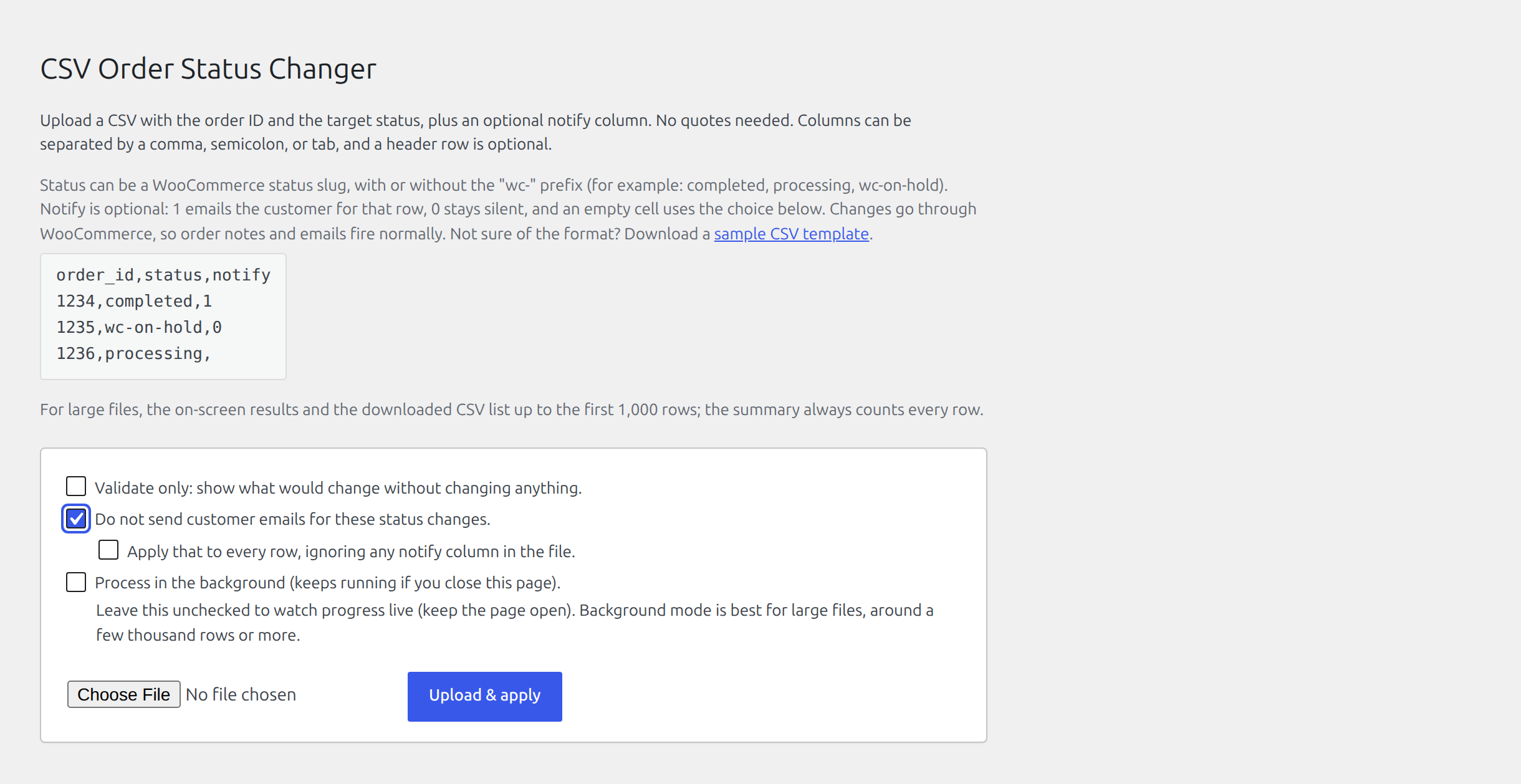
Choose whether WooCommerce sends customer emails for your status changes. Use the optional notify column to control each row, leave it blank to use the screen's choice, or apply the no-email choice to every row. Administrator notifications, order notes, and emails for other orders continue normally.
The headline features above are the highlights. Expand a section for the
complete list of everything the plugin can do.
The uploadPremium8
Order ID and target status, plus an optional per-row email column, handled forgivingly.
No plugin-imposed row-count limit; normal hosting and upload limits still apply
Optional header row, with columns recognised by name in any order
Invalid order IDs are reported as skipped, with the entered value and CSV row number
Optional notify column decides the customer email per row; leave a cell empty to use the screen's choice
Target status accepts a WooCommerce slug with or without the wc- prefix
Comma, semicolon, or tab delimiters, auto-detected
Excel / Windows UTF-8 BOM handled automatically
Download a sample CSV template generated from your store's own registered statuses
How it runsPremium6
Pick the mode that fits the job; both show a live progress bar with a cancel button.
Interactive mode processes fixed-size chunks, so the progress bar and result table fill in real time
Background mode hands very large or set-and-forget jobs to Action Scheduler, so they finish even if you close the page
A stuck background job (e.g. when WP-Cron isn't firing) is detected and offers a one-click Resume
Cancel a run at any point from the progress bar
Validate-only mode previews exactly what would change, per order, without changing anything
Do-not-send-customer-emails option skips customer notifications for imported orders and fills in any row whose notify column is empty; administrator notifications and order notes continue normally
The result logPremium7
Every row is reported so you know exactly what happened.
Per row: previous status, new status, and an outcome
Outcomes: Changed (or Would change in validate-only), Skipped, Needs attention, or Errored
Mistyped or empty order IDs appear in the log and CSV download, and count toward the skipped total
Search the log by order number, status, or result text
Filter the log by outcome
Open an order directly from its linked order number
Download the result log as a CSV, choosing the delimiter so it round-trips with your upload
Safe & compatiblePremium4
Changes behave exactly like a manual edit.
Every update goes through WooCommerce CRUD; order notes and status-change emails fire just as with a manual change
No direct-database mode (the legacy wp_posts write was removed as HPOS-incompatible)
HPOS (High-Performance Order Storage) and Cart & Checkout Blocks compatible
The admin screen and linked orders are available only to users who can manage WooCommerce orders
Premium licences
Unlock every workflow and choose how many stores you need.
Swipe, scroll, or use the arrows to compare all licence options.
Annual licences renew for continued updates and support; lifetime licences
are a one-time payment. Every plan includes a 7-day money-back guarantee.
Secure checkout, invoicing, and licence management by Freemius.