At volume, manually triaging incoming orders is slow and error-prone: “this one
ships freight”, “that one is all-digital, complete it”, “these go to the pickup
queue”.
Order Status Automation turns those repeated decisions into declarative rules:
when an order enters status A, if your conditions match, then move
it to status B (and tag it, notify your team, call your systems). It reacts to
every order transition, whether it came from checkout, the admin, the REST API,
or another plugin.
What it does
Visual rule builder
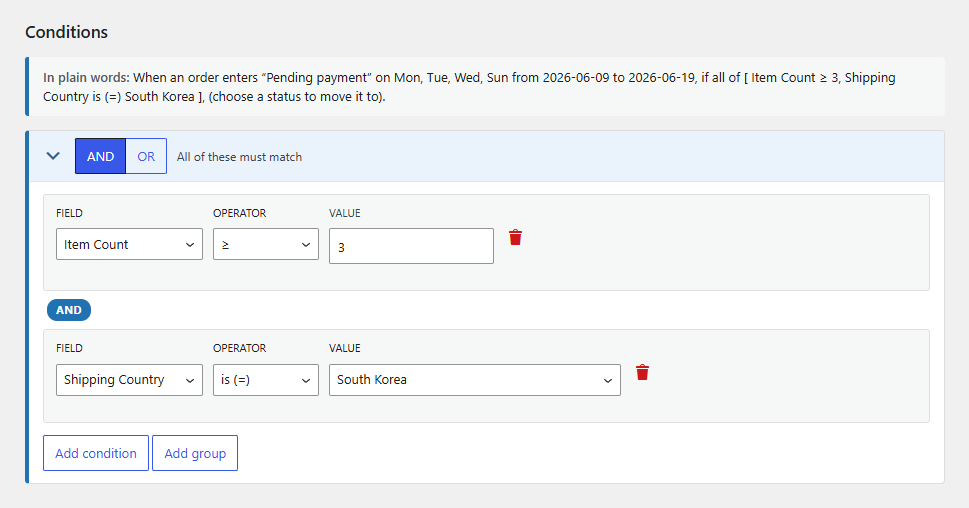
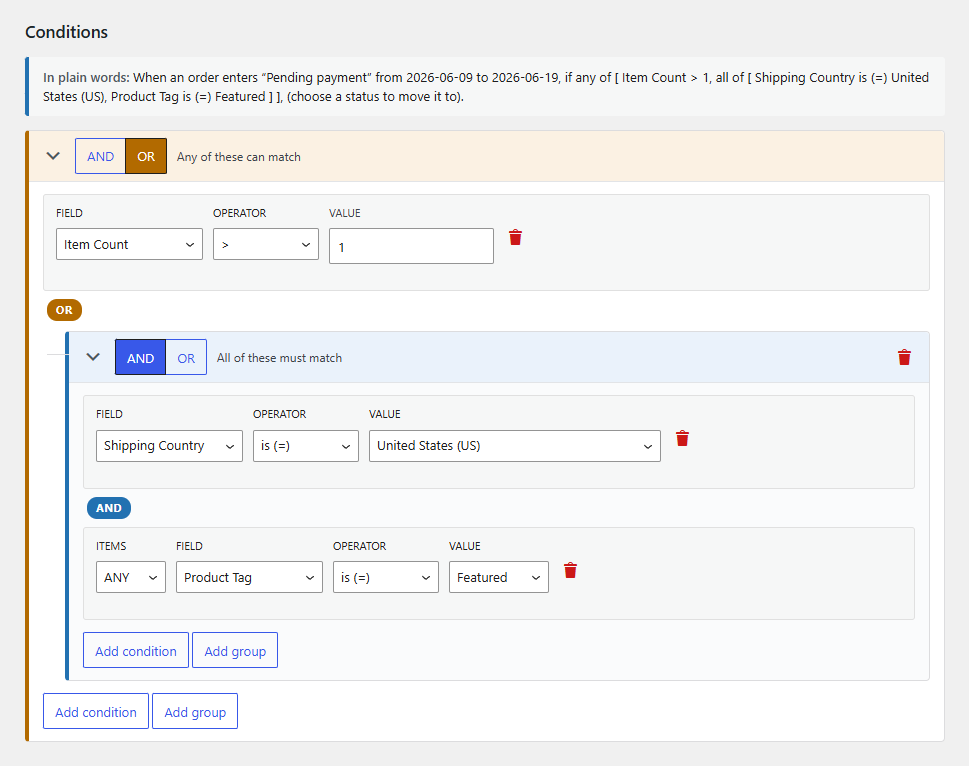
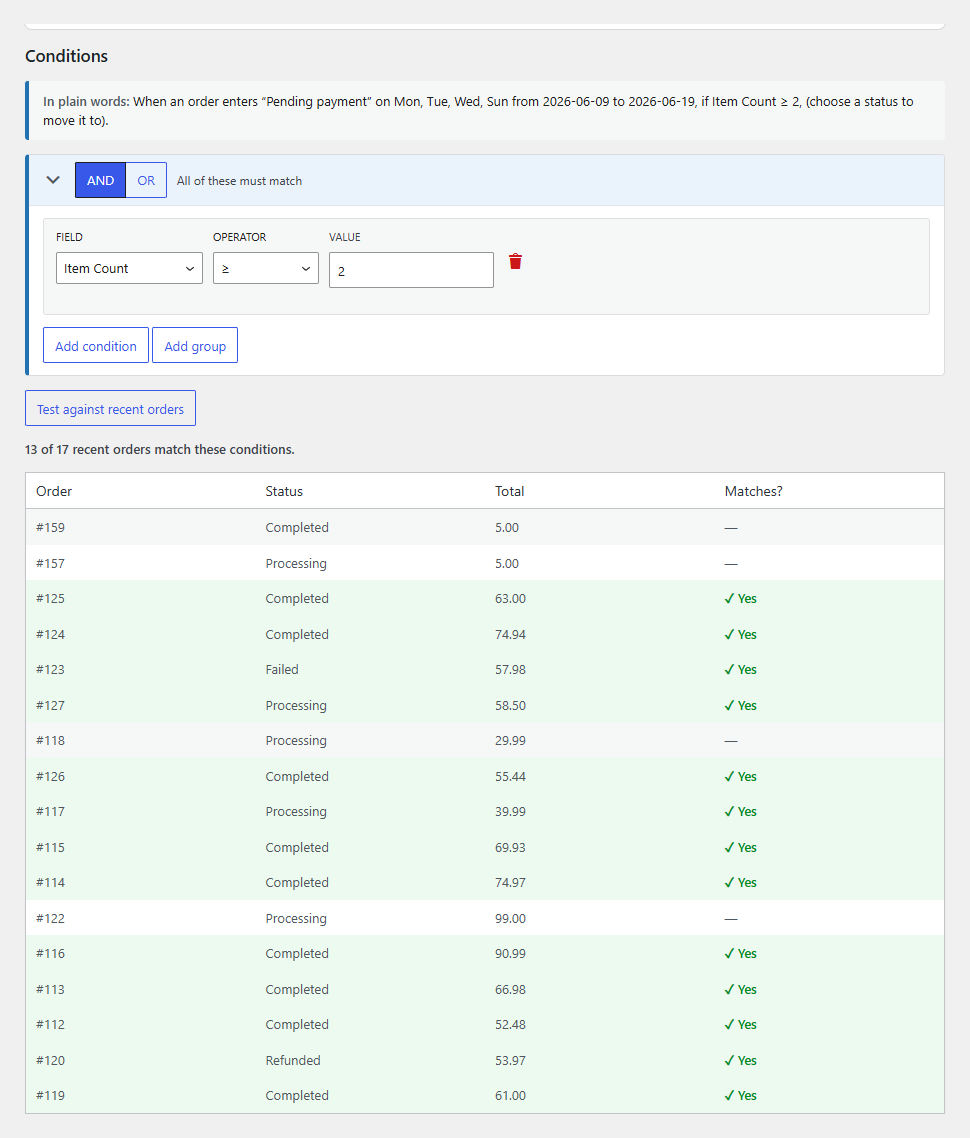
Nested AND/OR condition groups with a plain-English summary of every rule, so you can verify the logic at a glance. Dropdowns and type-ahead pick real store values like countries, gateways, products, and categories, never free text.
Two kinds of trigger
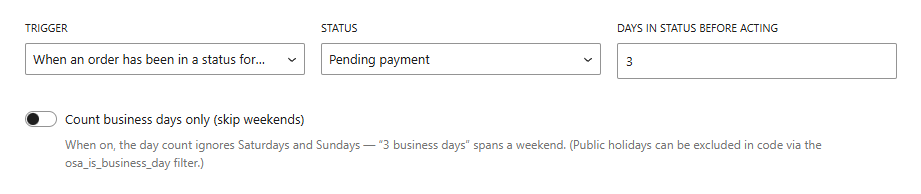
Fire when an order enters a status, or when it has been stuck in one for N days, counting calendar or business days. Chase stuck orders, auto-cancel abandoned payments, auto-complete digital sales.
Fire once an order has been in a status for N days
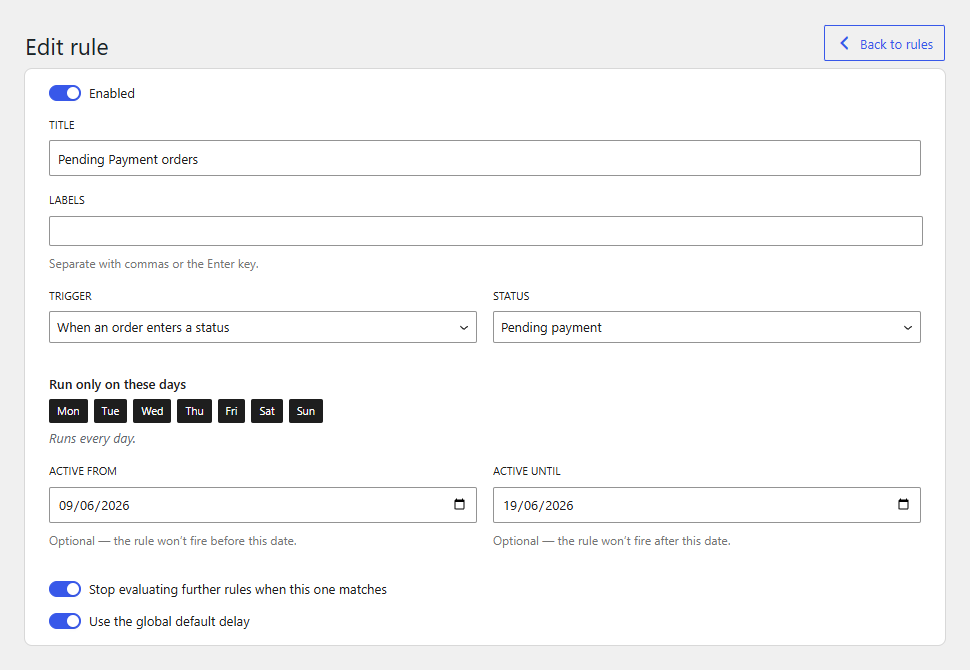
A focused rule editor
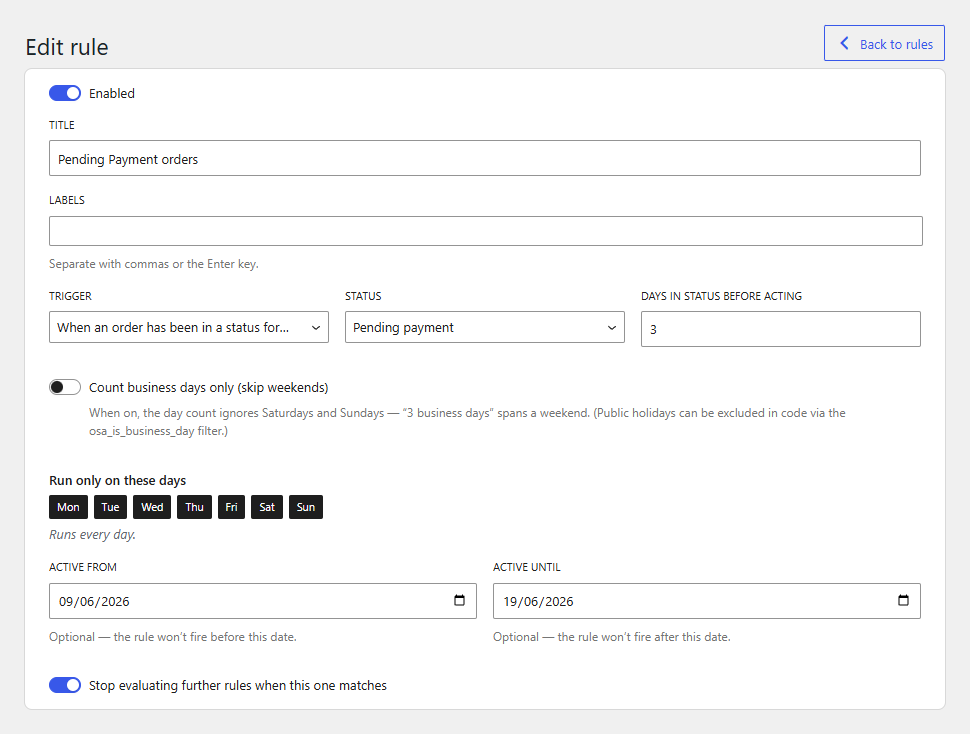
Build the whole rule on one screen: name and label it, choose the trigger and status, set its priority and delay, and control when it can run (only on certain weekdays, or within an optional active date range). Toggle any rule on or off without deleting it.
Time-in-status rules add a day count and a business-days option
Conditions for anything that sets an order apart
Destination, shipping or payment method, order total, customer history and role, item-level checks with an any/all/none quantifier, and a custom order-meta escape hatch for everything else.
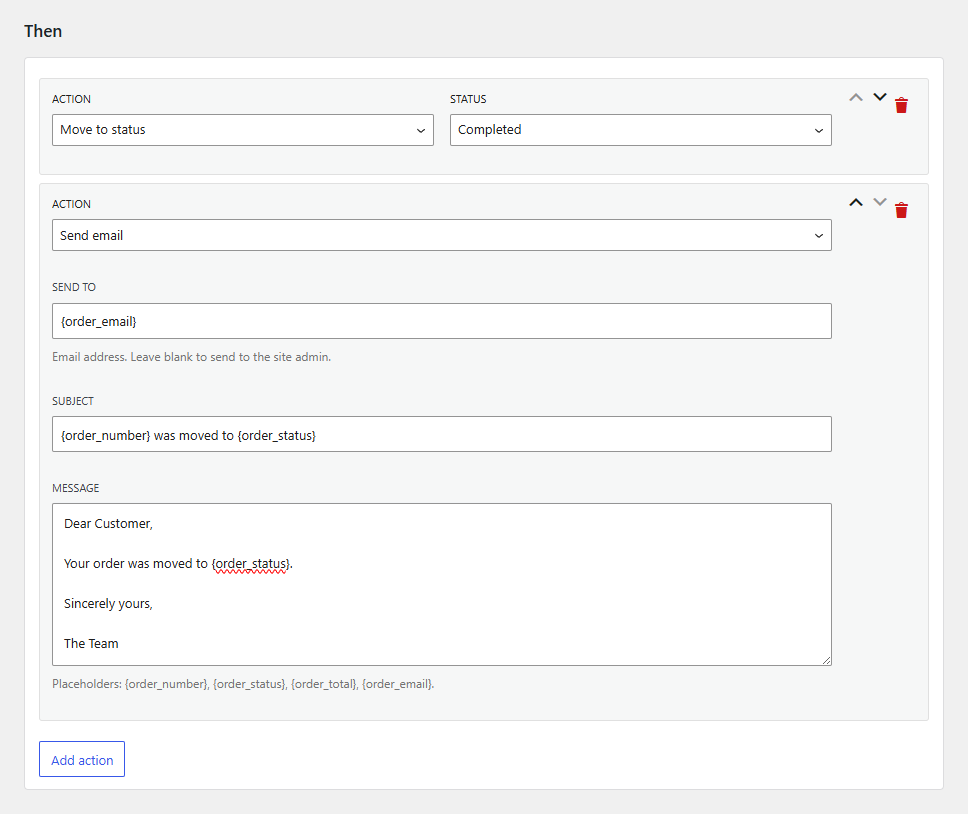
Multiple actions per rule
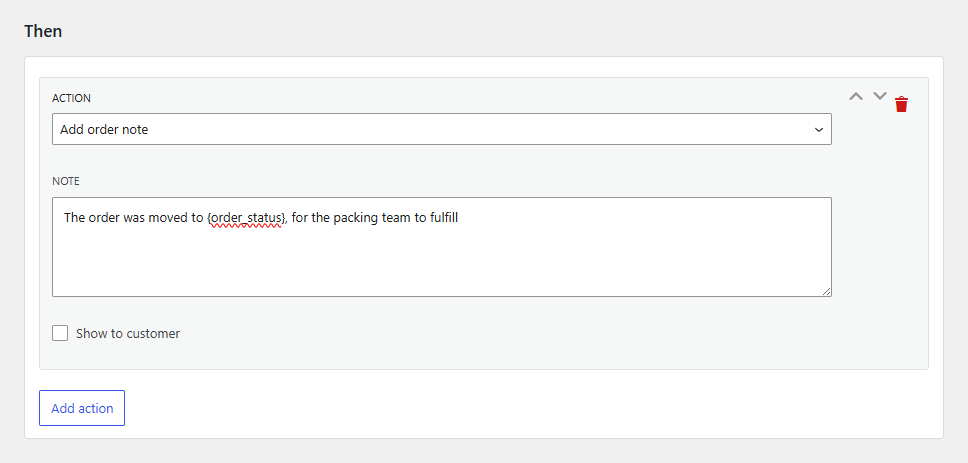
Change the status, add a note, tag the order, set meta, send a signed webhook or email, or post to Slack/Teams. Several actions run in order, with retry and backoff on delivery.
Stack several actions that run in order
Safe by design
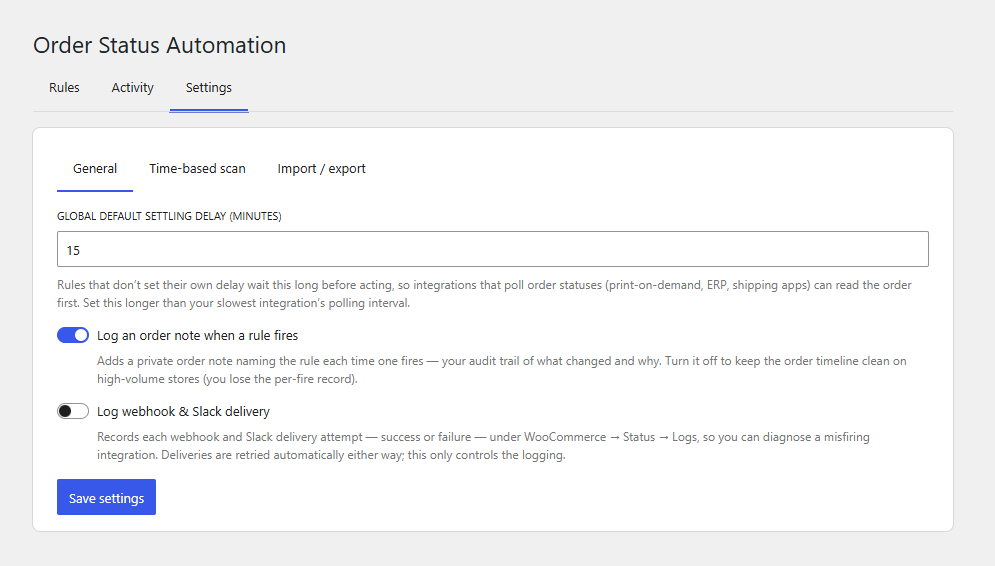
Asynchronous evaluation, a loop guard so chained rules can never run forever, a configurable settling delay so your other integrations read the order first, and a one-click pause switch.
Operations you can see
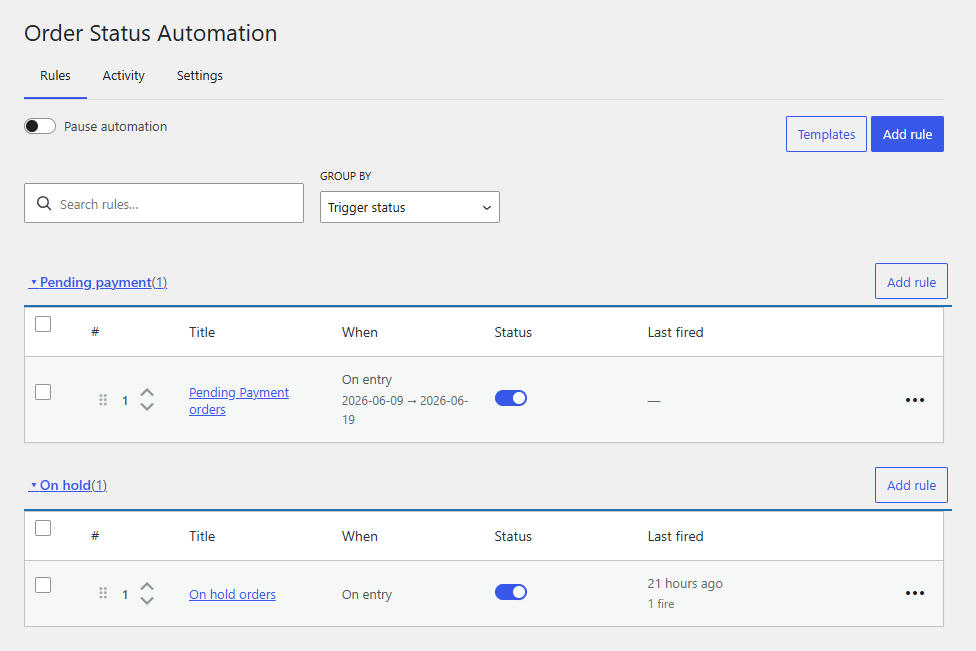
An activity log of every firing, last-fired and fire counts per rule, stale-reference warnings, drag-and-drop priority, rule import/export between sites.
Full capability list
The headline features above are the highlights. Expand a section for the
complete list of everything the plugin can do.
Triggers — the "when"6
Every rule fires on one of two triggers; the same conditions and actions apply to both.
When an order enters a status (reacts to checkout, admin edits, the REST API, WP-CLI, or another plugin)
When an order has been in a status for N days (a recurring background scan chases stuck orders)
Count those days as calendar days or business days (weekends skipped automatically)
Skip public holidays too — list them under Settings, in your site timezone
Restrict a rule to certain weekdays (e.g. Mon–Fri only)
Restrict a rule to an active-from / until date window for campaigns or seasonal handling
Conditions — the "if"22
Match on anything that sets an order apart. Combine conditions with nested AND/OR groups; item-level checks take an any / all / none quantifier across the order's items.
Shipping and billing country
Shipping and billing state / province
Shipping and billing postcode (exact, in a list, or partial match)
Shipping method
Payment method / gateway
Order total
Number of items in the order
Order currency
Customer type — guest or registered
Customer role (e.g. wholesale)
Customer lifetime order count (target repeat buyers)
Customer lifetime spend (target VIPs)
Whether the order has a customer note
Coupon used (type-ahead search)
Item product (type-ahead search)
Item product category
Item product tag
Item shipping class
Item product attribute (e.g. pa_color, pa_size)
Item is virtual
Item is downloadable
Custom order meta — compare any meta_key against a value, for anything the named fields don't cover
Operators7
How each condition compares, chosen per field.
is / is not
is any of / is none of (match a whole list in one condition)
greater than · at least · less than · at most (for totals, counts, spend)
contains (partial text match)
is empty / is not empty
any / all / none quantifier for item-level checks
Nested AND/OR groups up to 10 levels and 100 total conditions/groups per rule, with a plain-English summary of the whole rule
Actions — the "then"11
Stack several actions per rule; they run in order. The plain-English summary shows exactly what will happen.
Move the order to another status (which can trigger further rules — the loop guard keeps chains finite)
Add an order note, either private or customer-facing
Add a tag to the order
Remove a tag from the order
Assign the order to a staff user for fulfilment routing
Set custom order meta (financial and address keys are protected)
Send a signed webhook — JSON POST to your URL, HMAC-SHA256 signature
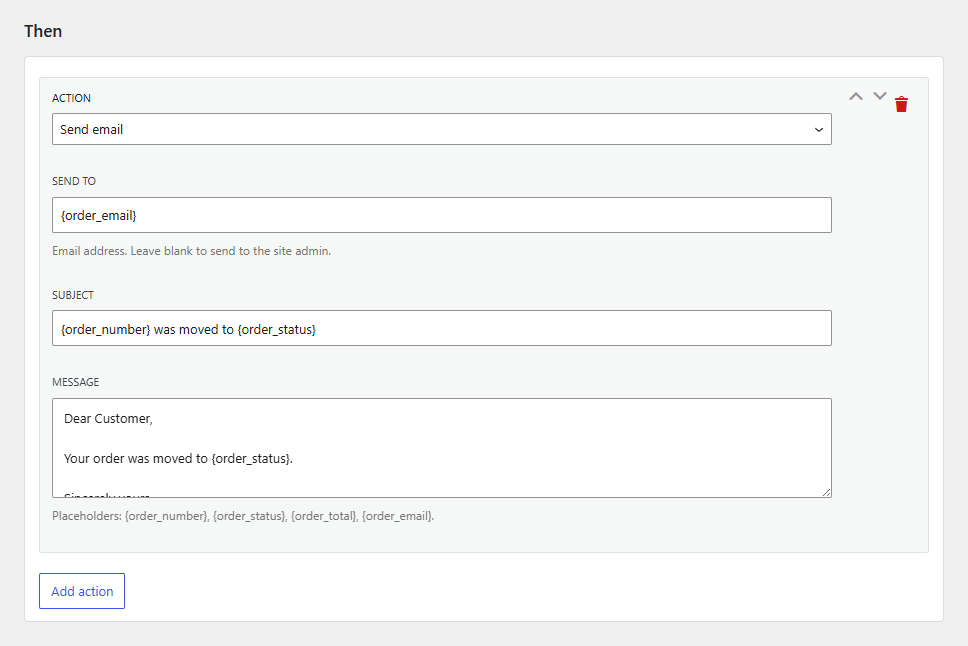
Send a templated email (subject and body)
Post to Slack or Microsoft Teams via an incoming webhook
Fill notes, emails, webhooks and messages with placeholders: order number, status, total, email, customer name, billing address, shipping address, phone
Webhook, Slack and Teams sends are queued off the firing path and retried with backoff if the endpoint fails
Building & organizing rules9
Everything around the rules themselves.
Visual rule builder — no code, with a plain-English summary of every rule
One-click starter templates (cancel unpaid, chase stuck orders, auto-complete, flag high-value) that open in the editor to review before saving
Field-aware inputs — pick real store values from dropdowns; products and coupons are type-ahead
Drag-and-drop priority within a status; the first matching rule wins, with an optional keep-evaluating
Free-text labels (e.g. EU, wholesale) to organize rules
Search and group the rules list — by status, label, or a derived order field like shipping country
Toggle any rule on or off without deleting it
Duplicate a rule to base a variant on it
Import / export all rules as JSON — additive and re-validated, so a bad file can't corrupt your rules
Running safely & at scale9
Built to run unattended on a busy store.
Asynchronous evaluation via Action Scheduler
Loop guard so chained rules can never run forever
Configurable settling delay (per rule or global) so other integrations read the order first; the rule is re-validated at execution time
One-click pause switch to halt all automation during migrations or bulk imports
Activity log of every firing (what rule, when, which order, which actions) — clearable
Last-fired time and total fire count per rule, with recent firings on hover
Stale-reference warnings when a rule points at a deleted product, category, tag, shipping class, coupon, or status
Run the time-based scan on demand instead of waiting for the next scheduled run
Tunable scan frequency and per-scan order batch size, each clamped to a safe range
Integration & compliance5
For developers and data-protection requirements.
WP-CLI: list, scan, export, import, dry-run preview, and explain-why-a-rule-fires
REST API for rules, activity, fields, actions, search, and settings
Extensible via hooks — add custom actions, condition fields, operators, and templates
GDPR: personal-data export and erase for the activity log, plus suggested privacy-policy text
HPOS (High-Performance Order Storage) and Cart & Checkout Blocks compatible
Pricing
Single site
1 site
$8.25 /month
Billed $99 annually
Plus
5 sites
$14.92 /month
Billed $179 annually
Agency
Unlimited sites
$24.92 /month
Billed $299 annually
Annual licences renew for continued updates and support; lifetime licences
are a one-time payment. Every plan includes a 7-day money-back guarantee.
Secure checkout, invoicing, and licence management by Freemius.
Frequently asked questions
Do I need to write code?
No. Rules are built entirely in the WooCommerce admin with dropdowns and type-ahead fields, and every rule shows a plain-English summary of what it does.
Does it work with HPOS (High-Performance Order Storage)?
Yes. The plugin declares HPOS compatibility and uses WooCommerce CRUD throughout. It also works with Cart & Checkout Blocks.
Can rules trigger each other in a loop?
No. A built-in loop guard lets rules chain safely but never cycle forever, and every automated change is logged with the rule that made it.
What happens when my license expires?
The plugin keeps working. An active license is needed for updates and support, not for the features you already have.
Is there a refund policy?
Yes, a 7-day money-back guarantee. If the plugin has a bug or problem we can't resolve, email us within 7 days of purchase for a full refund.