
Fix findings in bulk
PremiumFix a check's findings from its own list with one button where the finding already says what is wrong, or one value where it does not.
Reviewed 2026-09-11
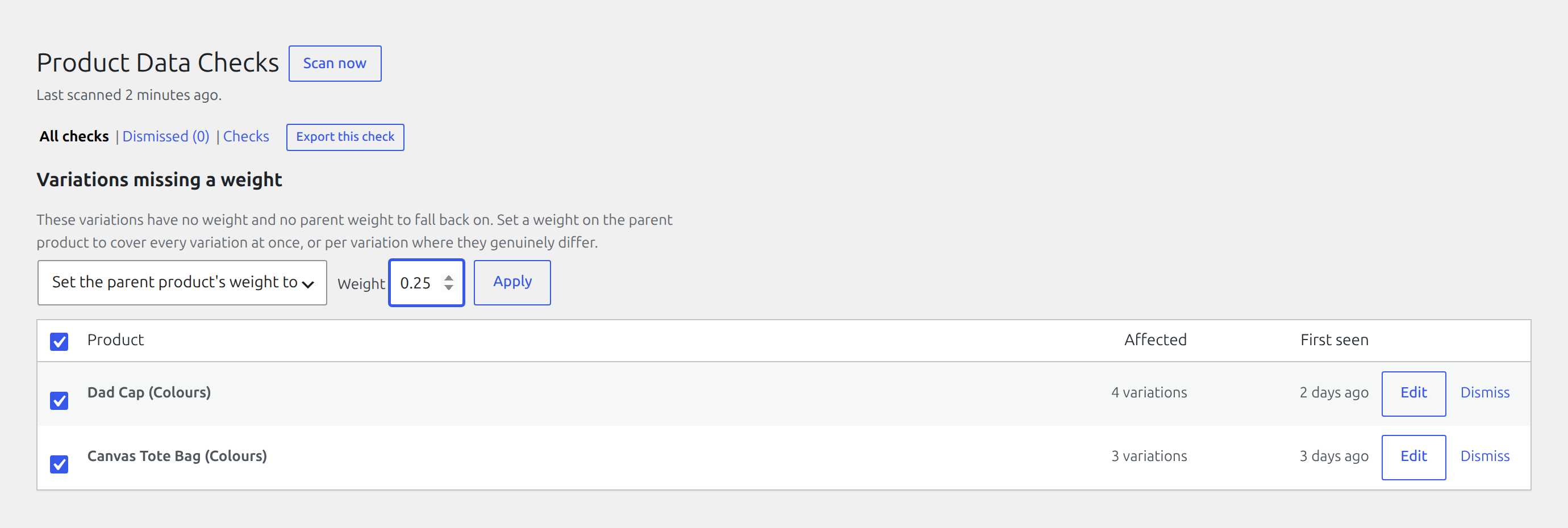
Free tells you which products are wrong and links you to each one. Pro adds the step after that: fixing them from the list you are already looking at.
This is not a bulk editor. You never choose products and fields. You choose a check, and what the fix does is decided by that check. The selection is already narrowed to products failing one specific rule, and that is what makes applying one action to all of them safe. For restructuring a catalogue, a spreadsheet editor is still the right tool.
Where it is
On any check’s own list, under WooCommerce → Product Data Checks → Review. A Bulk actions control appears above the table with a checkbox on every row. Which actions are offered depends on the check. A check with no safe bulk fix offers none, and the column does not appear at all.
Fixes that need nothing from you
Two checks describe their own remedy completely, so there is nothing to type:
- Virtual products with shipping data clears the weight and dimensions the check objected to. A shipping class is left alone: no check complained about it, and the shipping class check never looks at a virtual product in any case.
- Stock status contradicts the quantity sets the status from the quantity. The quantity never moves: it is a number somebody counted, and the status is derived from it, so the status is what gives way.
Fixes that take one value
You supply a single value and it is applied to everything selected:
| Check | What you give it |
|---|---|
| Missing weight | A weight |
| Variations missing a weight | A weight, set on the parent product |
| Incomplete dimensions | Length, width and height |
| Stock managed with no quantity | A quantity, or switch stock management off instead |
| Only in the default category | A category to file them under |
The variation case is the one worth knowing
A variation with no weight of its own reports its parent’s. So Variations missing a weight is fixed by setting the parent weight once, and every variation inherits it. A product with two hundred unweighted variations takes a single value. The findings screen already shows it as one row, so what you select is one row and what you fix is two hundred.
What it will not do
- It will not guess. Checks whose fix would be a judgement call are never offered one. Implausible weight is the clearest case: a weight of 45,000 might be a misplaced decimal, a gram-for-kilogram mix-up, or a genuinely heavy pallet item, and nothing on the record says which. Writing a guess under the banner of a fix is worse than leaving the fault visible.
- It will not overwrite what you already did. The check is re-run against each product before anything is written, so a product you fixed by hand since the last scan is left alone rather than having a bulk value written over it.
- It will not fill in what is already there. Only the dimensions actually missing are set. A product with a length and no width keeps its length.
- It will not remove anything. A category is added, not swapped in, and the default category stays. The check only asks that the product is filed somewhere other than the default.
- It will not treat an empty box as zero. Zero is a real weight and a real quantity, so it cannot double as “no answer”. Leave a field blank and nothing is written at all, rather than part of your selection being set to nothing.
- It will not report a fix that did not work. Each product is checked again after the write. If the fault is still there the finding stays on the list. A row that disappears while the problem remains is worse than one that never moved, because nobody looks at it again.
Dismissed findings are never touched
Dismissing a finding is your judgement that the product is fine. A bulk fix never acts on one, so it cannot overwrite that decision.
If your licence lapses
Bulk fixing stops being offered and the list goes back to reporting only. Nothing you already fixed is undone. Those are ordinary product values now, and they stay exactly as they are.